Every PIN has the same enemy, and it is not a hacker. It is the person standing right behind you.
Think about it. You unlock your phone on a bus, in a shop, at a family dinner. The pattern you draw leaves a shiny smudge trail on the screen, and your four digit PIN is punched on the same four spots you have used for years. Anyone half awake can copy it. Yesterday I tested a fingerprint app lock for my chats, and readers who follow that series can find its official download route in that review. Today the test is stranger. An app that hides your password inside a photograph, in a place only you know.
The app is called Visual Password, full name Visual Password Lock Screen, made by SunMoon JSC. It is free, with ads, and it has been downloaded more than 500,000 times. I will say the quiet part early, because this page always does. Its rating is only about 3.5 stars from roughly 1,800 ratings. That is a divided audience, and by the end of this test you will understand exactly why people are divided.
How a Password Inside a Photo Works
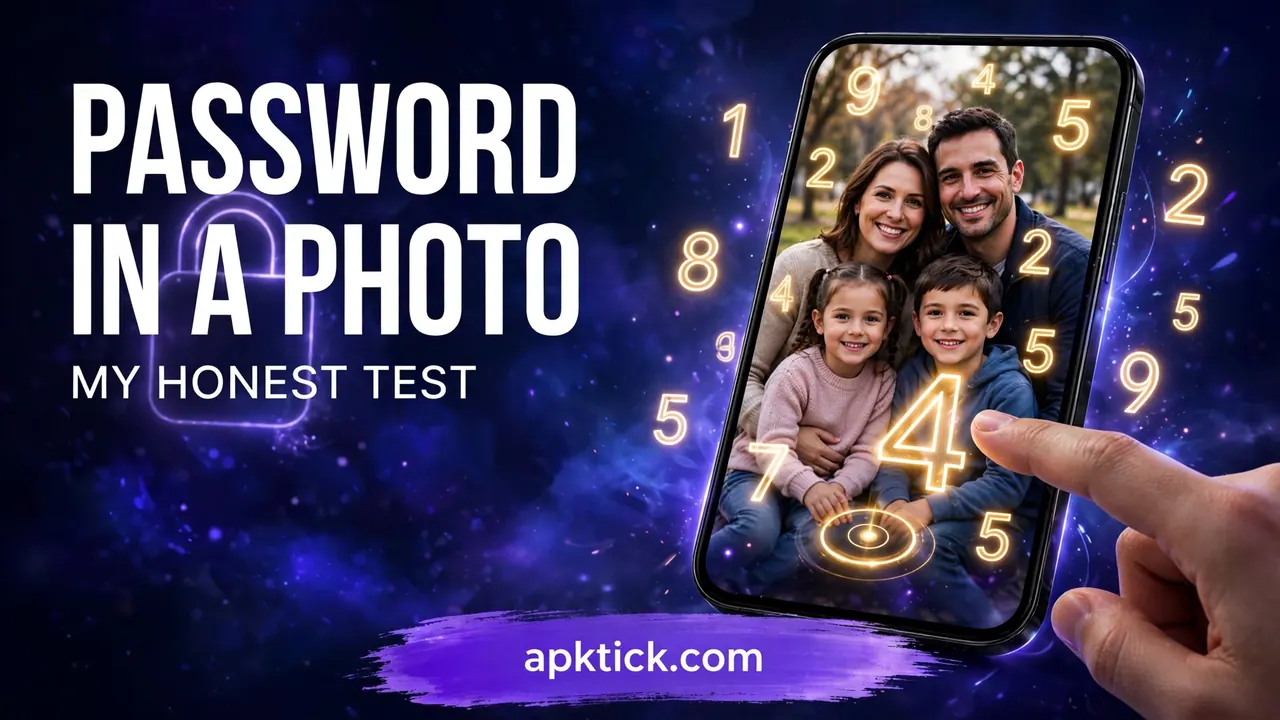
The idea is simple enough to explain to a child. You pick any photo from your gallery. Then you choose a number, and you place that number on one secret spot of the photo. That combination, the number and the spot together, becomes your password.
When you unlock, the photo appears with numbers scattered across it in random positions. You find your number wherever it landed this time, drag it onto your secret spot, and the phone opens.
Read that middle part again, because it is the whole invention. The numbers change places every single time. There is no fixed keypad. There are no same four spots. A watcher can stare at your hands all day and still learn almost nothing, because what you did yesterday cannot be repeated by watching. Your password is not a sequence. It is a memory of a place.
How I Set Mine Up
Step 1: I installed the app from the Play Store. The download button at the end of this post goes to the same official page, and with lock apps that official source matters, as it always does.
Step 2: I chose a family photo from a picnic, the kind of picture with a hundred details. A plain wallpaper is a weak choice here. You want faces, objects and corners you can remember precisely.
Step 3: I picked my number and placed it on one small, specific spot in the photo. Not the middle of a face, that is where everyone would guess. I chose a tiny detail at the edge that only I would remember.
Step 4: The app asked me to confirm the placement, and I set it as the lock.
Step 5: I locked the phone and tested it five times in a row. Each time the numbers stood in new places, each time I dragged mine home, and each time it opened. Setup genuinely takes two minutes.
Test One, the Shoulder Surfer
For the first test I did what this app was born for. I stood in my kitchen, handed my locked phone to my brother, and unlocked it twice right in front of his eyes while he watched my hands like a hawk.
Then I locked it and told him to open it. He knew my number. He had seen the photo. He dragged the number to three different spots, all wrong. The password was never the digit. It was the place, and the place lived only in my head.
Compare that with a normal PIN, which he has genuinely memorised from watching me over the years, to my embarrassment. On anti peeking alone, this strange little app beat the system lock on my phone without breaking a sweat.
Test Two, the Forgetting Fear
My second test was against myself. Photo passwords sound lovely on day one. The real question is day four, in a hurry, with the sun on the screen, when your brain is somewhere else.
So I used it as my lock for several days without writing anything down. The result surprised me. I never once forgot my spot. Visual memory is stubborn in a way digit memory is not. I forget four digit codes I invent within a week. I cannot forget that picnic photo detail, because it is a picture, not a number.
But honesty demands the other half. Twice, in a rush, I dropped my number a few millimetres away from the exact spot and the phone refused me. The app wants precision. On a crowded bus with one hand busy, that little drag can take a second attempt. It is not a flaw in the idea, it is the price of it, and some users will find that price annoying within a day. I suspect this, more than anything, is where those divided 3.5 star reviews come from. Some users also report pop ups pushing the paid version, which the free version does carry along with its ads.
What I Liked, and the Limits Nobody Mentions
The likes are real. The shuffle kills shoulder surfing completely. There is no smudge trail to read. The lock is personal in a way no PIN can be, because your photo is yours. And as a second layer over a phone, it is genuinely fun to use, which sounds silly until you remember that a lock you enjoy is a lock you keep. It also costs you nothing to try, because the free version carries every feature that mattered in the test I ran here.
Now the limits, and they matter. This is an app, not your phone’s built in system lock. Treat it as a clever second door, never as the only door. Keep your normal phone lock switched on underneath it, the same advice I gave in every lock test on this site, including the older secret tap picture lock, whose official download page follows the same Play Store rule. A determined person with time and your phone in hand is a problem no lock app fully solves.
Two more honest warnings. If you ever forget both your number and your spot, you have locked yourself out of your own fun, so choose a spot you could find in your sleep and keep a private note at home. And because the app has not been updated very often in recent years, test it properly on your own phone before trusting it as your daily lock. On mine it behaved. Your phone, your test.
Would I Trust My Phone to a Photo?
As the only lock? No, and no honest reviewer should tell you otherwise. As an anti peeking layer on top of your normal lock, for phones that live in crowded homes, buses and offices? Yes, gladly. It solves the one problem PINs and patterns never could, the audience standing behind you.
Try it with a detailed photo, a forgettable number and an unforgettable spot. And whatever you do, get it only from the official Play Store page, because a fake lock screen is the one password trick that is genuinely dangerous.